
 Better Mistakes



音乐
暂未播放
图、表、代码与交叉引用
- 1第一份文档:标记语法、编译与 watch
- 2代码模式:值、类型与控制流
- 3函数与 content:一切都是函数调用
- 4set 与 show:样式是规则,不是命令
- 5字体与中文排版
- 6页面与布局:盒子、网格与浮动
- 7context、计数器与状态:Typst 如何“多遍”编译
- 8数学公式
- 9图、表、代码与交叉引用本文
- 10参考文献:BibTeX、Hayagriva 与 GB/T 7714
- 11数据驱动:用一份 YAML 生成中英文简历
- 12作业模板:模块、多文件与条件编译
- 13幻灯片与绘图
- 14生态:Typst Universe 与第三方包
- 15用 Rust 写一个 WebAssembly 插件:按拼音排序术语表
- 16导出、工具链与 CI
写到图表,我先把 xuan 里按章编号的做法拆掉,看会坏成什么样。结果是第 1 章里的图被第 2 章的 @a 引用成了“图 2.1”。这一篇的主线就是这个 bug 的两个变种(引用处,目录里),以及 Typst 的 figure、table、raw 这几个元素怎么配合,才能让一份笔记里的图、表、代码清单都带着“章.序号”的编号、能被 @label 引用、风格统一。
这一篇结束时你会有三个最终版文件:src/figure.typ、src/units.typ、src/code.typ。lib.typ 只新增一行(导出 num、qty、qty-range),src/base.typ 是中间版本:它在这一篇之前已经接了 math-rules,这一篇的内容是 figure-rules 与 code-rules 两行 import 和两行 show:,我会贴出整个文件,并在正文里指出新增的 import 与 show: 是哪几行。lab/ch09/ 下的 9 个文件全部通过 make ch09,make test 里的 tests/units.typ 通过。
前置:第 7 篇(counter、context、定理环境里的 show ref)。图表的编号和定理是同一套机制,那一篇没读的话,下面“为什么要在引用处重算”一节会显得突兀。
figure:任何东西都可以是一张图
先看 lab/ch09/figures.typ(源文件):
// figure: kinds, captions, labels, placement. Numbers are <chapter>.<n>.#import "@local/xuan:0.1.0": *#set page(width: 12cm, height: auto, margin: 1cm)#show: xuan-base
= 投影
#figure( image("assets/projection.svg", width: 60%), caption: [$b$ 在 $C(A)$ 上的投影。],) <fig-proj>
@fig-proj 的残差与列空间正交。第二张图同章,编号递增:
#figure( rect(width: 3cm, height: 1cm, fill: luma(230))[占位], caption: [任意内容都可以放进 figure,kind 自动推断为 `image`。],) <fig-rect>
= 下一章
#figure( image("assets/projection.svg", width: 40%), caption: [编号在新章重置。], placement: auto, // float to the top or bottom of the page) <fig-again>
见 @fig-proj、@fig-rect 与 @fig-again。figure 把一段内容包起来,加上标题、编号和 supplement(“图”“表”这个前缀词)。几个值得停一下的点。
kind 决定编号归哪个计数器、supplement 叫什么。 我没有写 kind,Typst 会看 body:image(...) 是 image,table(...) 是 table,raw 块是 raw。第二张图里放的是一个 rect,它也叫“图 1.2”,源文件注释里写的就是这个。自定义 kind 可以是任意字符串,我在后面的子图和“演示”例子里用。raw 块作为 figure 的 kind 我也编译了一遍,在 figure.typ 那一节后面。
placement: auto 让图成为浮动体:Typst 自己挑页面顶部或底部放。渲染图里最后那张“图 2.1”被甩到了页面最上面,在“1 投影”标题之前,这就是浮动。(这个 lab 页面是 height: auto,所以“页面顶部”就是整个文档的最上面,看起来有点滑稽。)不浮动时,图是一个块,按出现位置排;caption 位置默认在图下方,下面讲表格时会改成上方。
<fig-proj> 这种 label 贴在 figure 上。 之后 @fig-proj 就能引用。label 必须紧跟在内容之后:如果 figure(...) 本身出现在函数调用的参数里,写成 f(figure(...) <l>, 1) 是语法错误,我在 /tmp/p09/exp/lab.typ 里试过(实验文件,不在仓库里),报 error: expected comma。把它包进内容块 [#figure(...) <l>] 就合法了。
在仓库里编译:
$ nix develop --command make ch09./scripts/chapter.sh ch09ok lab/ch09/fig-code.typok lab/ch09/fig-table.typok lab/ch09/figures.typok lab/ch09/outline.typok lab/ch09/raw.typok lab/ch09/refs.typok lab/ch09/subfigures.typok lab/ch09/tables.typok lab/ch09/units.typ渲染出来是这样(在仓库根目录用 typst compile --root . --ignore-system-fonts --format png --ppi 110 lab/ch09/figures.typ figures.png 生成,本篇其他 lab 渲染图同理):
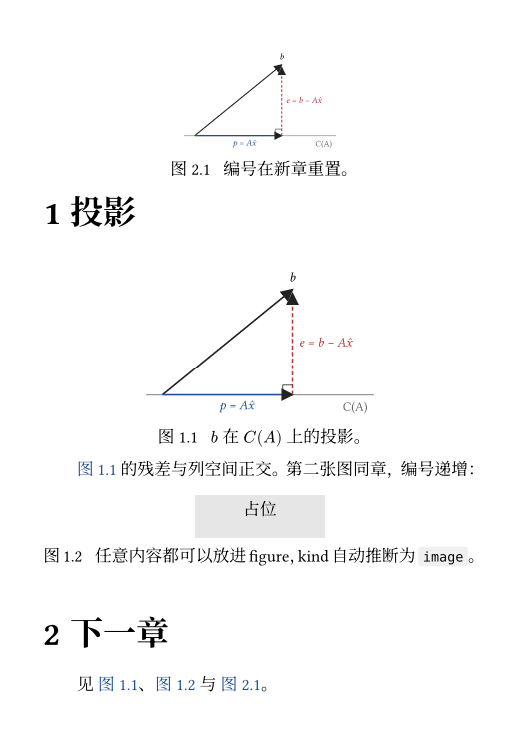
编号“1.1”“2.1”不是 Typst 的默认行为。默认的图编号是全文连续的 1、2、3,“按章编号”是 xuan 的 figure.typ 做的,下面就来看它。
为什么 ref 的编号要在引用处之外算
要按章编号,需要两样东西:标题计数器(第几章)和图计数器(本章第几张)。天真的写法是给 figure 设一个编号函数,在里面读 counter(heading)。这个写法我在 /tmp/p09/exp/noref.typ 里试了(实验文件,不在仓库里):
#set text(lang: "zh")#set heading(numbering: "1.1")#show heading.where(level: 1): it => { counter(figure.where(kind: image)).update(0) it}#set figure(numbering: n => context numbering( "1.1", counter(heading).get().first(), n,))
= 一#figure(rect[甲], caption: [甲图]) <a>= 二#figure(rect[乙], caption: [乙图]) <b>见 @a 与 @b。$ typst compile --root . --ignore-system-fonts noref.typ noref.pdf$ pdftotext -layout noref.pdf -1一 甲 图 1.1 甲图
2二 乙 图 2.1 乙图见 图 2.1 与 图 2.1。图下面的标题是对的,“见”那一行错了:@a 指向第 1 章的甲图,却被排成了“图 2.1”。
机制是这样的。@a 展开成一个 ref 元素,它要显示“图 N”,就得拿 figure 的 numbering 对这张图的计数值做格式化。我写的 numbering 是 n => context numbering("1.1", counter(heading).get().first(), n),这个 context 是在调用 numbering 的地方求值的。图标题里调用它,counter(heading).get() 就是“此刻的章号”,对。ref 里调用它,“此刻”变成了引用所在的位置,也就是第 2 章,于是甲图拿到了乙图的章号。ref 并没有记下“这个编号是在图那里算出来的”。
打个比方:counter.get() 像看银行 App 里此刻的余额,counter.at(loc) 像调出某一天的对账单。我要的永远是图所在那一天的对账单,而不是翻开 App 那一刻的余额。第 7 篇的定理环境用的是同一招。
修法是不让 ref 自己去求值:重写 show ref,从 it.element 取出被引用的那张图,用它的 location() 读两个计数器在图所在位置的值。/tmp/p09/exp/withref.typ(同样是实验文件):
#set text(lang: "zh")#set heading(numbering: "1.1")#show heading.where(level: 1): it => { counter(figure.where(kind: image)).update(0) it}#set figure(numbering: n => context numbering( "1.1", counter(heading).get().first(), n,))#show ref: it => { let el = it.element if el != none and el.func() == figure { let loc = el.location() let n = numbering( "1.1", counter(heading).at(loc).first(), el.counter.at(loc).first(), ) link(loc, [#el.supplement~#n]) } else { it }}
= 一#figure(rect[甲], caption: [甲图]) <a>= 二#figure(rect[乙], caption: [乙图]) <b>见 @a 与 @b。$ typst compile --root . --ignore-system-fonts withref.typ withref.pdf$ pdftotext -layout withref.pdf -1一 甲 图 1.1 甲图
2二 乙 图 2.1 乙图见 图 1.1 与 图 2.1。对了。el.counter.at(loc) 的 el.counter 是这张图所属 kind 的计数器,counter(heading).at(loc) 是标题计数器,.first() 取顶层章号。两个值都由 loc 决定,跟谁来引用无关。
figure.typ:把这套规则收进模块
最终版 src/figure.typ(63 行,源文件)完整贴在这里,下面逐段拆:
// Figures and tables numbered "<chapter>.<n>", three-line tables.
#let figure-kinds = (image, table, raw)
/// "<chapter>.<n>" for the figure `el`, evaluated at its own location.#let figure-number(el) = { let loc = el.location() numbering( "1.1", counter(heading).at(loc).first(), el.counter.at(loc).first(), )}
#let figure-rules(body) = { show heading.where(level: 1): it => { for k in figure-kinds { counter(figure.where(kind: k)).update(0) } it } set figure(numbering: n => context numbering( "1.1", counter(heading).get().first(), n, )) show figure.where(kind: table): set figure.caption(position: top)
// Three-line tables: no verticals, rules above, below the header, below. set table(stroke: (x, y) => ( top: if y == 0 { 1pt } else if y == 1 { 0.5pt } else { 0pt }, )) show table.cell.where(y: 0): strong // The closing 1pt rule is an hline after the last row. show table: it => { let f = it.fields() let cells = f.remove("children") let closed = cells.len() > 0 and cells.last().func() == table.hline if closed { it } else { table(..f, ..cells, table.hline(stroke: 1pt)) } }
// Outline entries evaluate `numbering` at the outline, not at the figure. show outline.entry: it => { let el = it.element if el.func() == figure and el.kind in figure-kinds { link(el.location(), it.indented( [#el.supplement~#figure-number(el)], it.inner(), )) } else { it } }
show ref: it => { let el = it.element if el != none and el.func() == figure and el.kind in figure-kinds { let supp = if it.supplement == auto { el.supplement } else { it.supplement } link(el.location(), [#supp~#figure-number(el)]) } else { it } } body}figure-kinds = (image, table, raw):这是三种会按章编号的 kind。放在一个数组里,章节重置、show ref、show outline.entry 三处都用它判断“这是不是我的图”。subfigure、自定义 kind 不在里面,所以它们走 Typst 默认的编号,后面会看到。
figure-number(el):上一节实验里那段计算,抽成函数。numbering("1.1", 章, 序) 把两个整数拼成“2.1”,这里的 "1.1" 是 numbering 模式字符串,两个 1 各吃一个参数。
章节重置: show heading.where(level: 1) 先对三种 kind 各调一次 counter(figure.where(kind: k)).update(0),再把标题原样输出。这样每进入新章,图、表、代码清单的序号都归零。it 原样返回,所以标题的外观不受影响。
set figure(numbering: ...):图自己的标题里显示的编号。这里允许用 context,因为标题就在图里面,“此刻”和图的位置一致,不会错。
show figure.where(kind: table): set figure.caption(position: top):表题放在上面,图题保持默认在下面。这是 show-set 规则,第 4 篇讲过,对 kind: table 的图才生效,raw 清单仍是题在下。
三线表: set table(stroke: (x, y) => (top: ...)) 给 stroke 一个函数,参数是单元格的列号和行号。第 0 行上边 1pt,第 1 行上边 0.5pt(也就是表头下面),其余 0pt,没有左右竖线。show table.cell.where(y: 0): strong 把第 0 行加粗。最后的 1pt 线在表的下沿,它不是任何一个单元格的“上边”,所以得追加一个 table.hline(stroke: 1pt)。
这个追加的 show 规则有一个陷阱。 如果每次都无条件追加 table.hline,新造出来的 table 还是 table,又触发同一条 show 规则。我在 /tmp/p09/exp/nocheck.typ 里试了这种写法,Typst 报 error: maximum show rule depth exceeded,hint 是 maybe a show rule matches its own output。修法是看最后一个子元素是不是已经是 table.hline,是就原样返回,不是才追加。it.fields() 返回表的全部参数(包括 children),我把 children 取出来,再用 ..cells 展开重建。第二次进入规则时最后一项已经是 hline,递归停止。
show ref:只接管指向 figure 且 kind 在 figure-kinds 里的引用,其余(标题、公式、书目)原样放行。supplement 有两个来源:it.supplement 是用户写的 @fig-proj[见图] 那种方括号里的内容,auto 表示用户没写,这时用图自己的 el.supplement(中文文档里是“图”“表”)。link(el.location(), ...) 让引用可点击,~ 是不换行空格。
show outline.entry:这是 figure.typ 里最后加上的一段(52 行变成 63 行),下一节讲。
代码清单也是 figure
figure-kinds 里的第三项 raw 是给代码清单的。我在 /tmp/p09/exp/rawfig.typ 里编译了最小例子(实验文件,不在仓库里):
#import "@local/xuan:0.1.0": *#set page(width: 12cm, height: auto, margin: 1cm)#show: xuan-base
= 代码
#figure( ```rust fn main() {} ```, caption: [最小的 Rust 程序],) <lst-main>
见 @lst-main。$ typst compile --root . --ignore-system-fonts rawfig.typ rawfig.pdf$ pdftotext -layout rawfig.pdf -1 代码 1 fn main() {}
代码 1.1 最小的 Rust 程序 见 代码 1.1。raw 块放进 figure 后 kind 自动是 raw,中文文档里 supplement 是“代码”,编号和图、表各自独立地按章从 1 数起,题注在下面,引用走的也是上面那条 show ref。
目录里的同一个 bug
lab/ch09/outline.typ(源文件)生成目录、图目录和表目录:
// outline: contents, and lists of figures and tables.#import "@local/xuan:0.1.0": *#set page(width: 12cm, height: auto, margin: 1cm)#show: xuan-base
#outline(title: [目录], depth: 2)#outline(title: [图目录], target: figure.where(kind: image))#outline(title: [表目录], target: figure.where(kind: table))
= 一== 一点一#figure(rect[图], caption: [第一张图])= 二#figure(table(columns: 1)[表], caption: [第一张表])outline(target: ...) 的 target 是一个选择器,figure.where(kind: image) 只列图,kind: table 只列表,默认的 target 是标题。
这个文件我第一次编译,图目录里的条目是“图 0.1 第一张图”,表目录里是“表 0.1 第一张表”,正文里却是“图 1.1”“表 2.1”。原因和上一节一样:目录条目要显示编号,就拿图的 numbering 在目录所在的位置求值,那里还没有任何标题,章号是 0。这是我写 figure.typ 时漏掉的,修在 show outline.entry 里:
// Outline entries evaluate `numbering` at the outline, not at the figure. show outline.entry: it => { let el = it.element if el.func() == figure and el.kind in figure-kinds { link(el.location(), it.indented( [#el.supplement~#figure-number(el)], it.inner(), )) } else { it } }outline.entry 是目录里每一行的元素,it.element 是它指向的东西(图、标题等)。我对指向 figure 的条目重建:前缀文字(indented 的第一个参数)改成 supplement~figure-number(el),由我自己拿图的位置算;it.inner() 是条目的其余部分,即标题、点线和页码。标题类的条目不动。因为重建时丢了默认的链接,所以外面包一层 link(el.location(), ...),渲染图里图目录和表目录的条目是蓝色的就是这个缘故,章节目录的条目没有。
$ pdftotext -layout out/ch09/outline.pdf - | head -14目录1 一 . . . . . . . . . . . . . . . . . . . . . . . . . . . . . . . . . . . . . . . . . . . . . . . . . . . . . . . . . . . . . . 1 1.1 一点一 . . . . . . . . . . . . . . . . . . . . . . . . . . . . . . . . . . . . . . . . . . . . . . . . . . . . 12 二 . . . . . . . . . . . . . . . . . . . . . . . . . . . . . . . . . . . . . . . . . . . . . . . . . . . . . . . . . . . . . . 1
图目录图 1.1 第一张图 . . . . . . . . . . . . . . . . . . . . . . . . . . . . . . . . . . . . . . . . . . . . . . . . 1
表目录表 2.1 第一张表 . . . . . . . . . . . . . . . . . . . . . . . . . . . . . . . . . . . . . . . . . . . . . . . . 1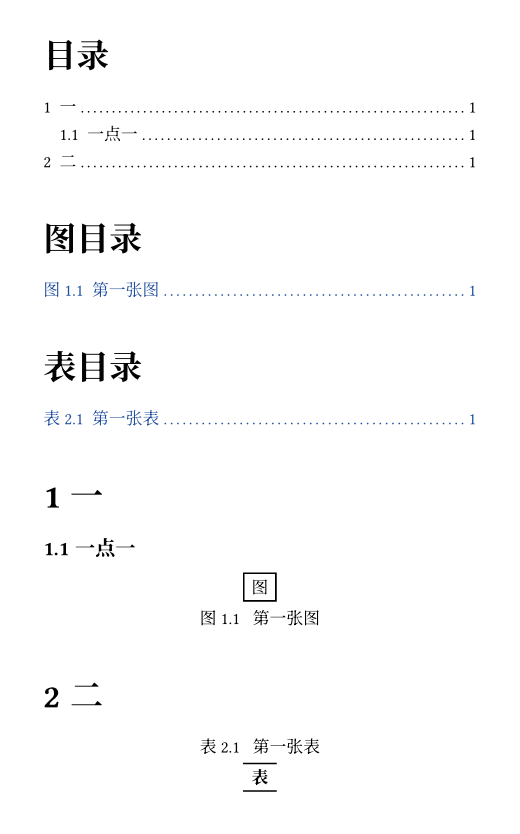
(我没有给 xuan 的 note 默认加图目录,需要时自己 #outline(title: [图目录], target: figure.where(kind: image))。)
表格:三线表之外的 table
前面说三线表的规则在 figure.typ 里,现在看 lab/ch09/tables.typ(源文件):
// table: header, cell spans, hline/vline, fill and align functions.#import "@local/xuan:0.1.0": *#set page(width: 12cm, height: auto, margin: 1cm)#show: xuan-base
= 数据
#figure( table( columns: (auto, 1fr, 1fr), align: (left, right, right), table.header[方法][误差][耗时], [正规方程], [1.2e-3], [4.1 ms], [QR], [8.0e-4], [6.3 ms], [SVD], [7.9e-4], [19.4 ms], ), caption: [三种最小二乘解法。表题在上,三线表由 xuan 提供。],) <tab-methods>
// Everything below is plain `table`: spans, extra rules, fills.#table( columns: 4, align: center, fill: (x, y) => if y > 0 and calc.odd(y) { luma(245) }, table.header(table.cell(colspan: 4)[合并表头]), table.hline(stroke: 0.5pt), [a], [b], [c], [d], table.cell(rowspan: 2)[跨行], [1], [2], [3], [4], [5], [6], table.footer[页脚][-][-][-],)
见 @tab-methods。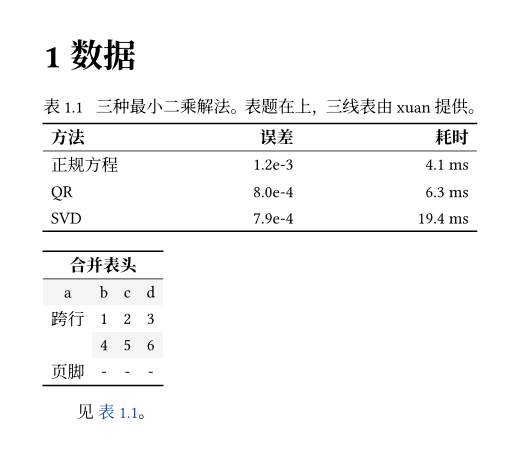
第一张表是正常用法:columns: (auto, 1fr, 1fr) 一列按内容、两列平分剩余宽度,align: (left, right, right) 按列设对齐,table.header[...] 声明表头行。三线表的线全部来自 xuan,这里一行线条参数都没有写。
第二张表是 table 的几个其他功能,值得注意它也画成了三线的样子,因为 xuan-base 里的 set table(stroke: ...) 对整篇文档生效:
fill: (x, y) => ...:fill也可以是函数,这里给奇数行铺浅灰色。函数返回none表示不填,所以if没有else也可以。table.cell(colspan: 4)[...]与rowspan: 2:跨列和跨行,单元格里写table.cell才能带参数。table.hline(stroke: 0.5pt):在当前位置画一条横线。和它成对的table.vline画竖线。table.footer[...]:页脚行,和table.header对应。
三线表和单位放在一起的例子是 lab/ch09/fig-table.typ(源文件),表里的数字和耗时用了下面要讲的 num 与 qty:
#import "@local/xuan:0.1.0": *#set page(width: auto, height: auto, margin: 12pt)#show: xuan-base#set par(first-line-indent: 0pt)
#figure( table( columns: (auto, auto, auto), align: (left, right, right), table.header[方法][误差][耗时], [正规方程], [#num("0.0012")], [#qty(4.1, "ms")], [QR], [#num("0.0008")], [#qty(6.3, "ms")], [SVD], [#num("0.00079")], [#qty(19.4, "ms")], ), caption: [三线表与单位],)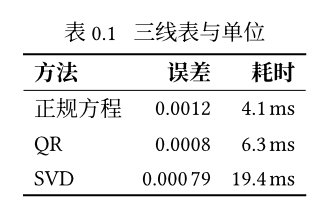
编号是“表 0.1”而不是“表 1.1”:这个文件里没有任何标题,章号取的是标题计数器的当前值 0。这不是 bug,是 "1.1" 这个编号规则在没有章的情况下的诚实结果;真正的笔记里表总在某一章之下。num("0.00079") 的小数部分有 5 位,从左起每 3 位一组,所以图里是 0.000 79;0.0012 只有 4 位,不分组。
我另外做了一个 /tmp 里的实验(不在仓库里),把 stroke、fill、align 都写成函数,再加 table.cell(fill:)、table.cell(align:)、table.vline、grid.cell(colspan:),并让 figure 带一个自定义 kind。/tmp/p09/exp/grid.typ:
#import "@local/xuan:0.1.0": *#set page(width: 12cm, height: auto, margin: 1cm, numbering: "1")#show: xuan-base= 方法#set par(first-line-indent: 0pt)
#figure( table( columns: (auto, 1fr, 1fr), align: (x, y) => if x == 0 { left } else { right }, stroke: (x, y) => ( top: if y == 0 { 1pt } else if y == 1 { 0.5pt }, left: if x == 2 { 0.5pt + gray }, ), fill: (x, y) => if y > 0 and calc.even(y) { luma(245) }, table.header[方法][误差][耗时], [A], table.cell(fill: yellow.lighten(60%))[#highlight[1.2e-3]], [4.1], [B], [8.0e-4], table.cell(align: center)[6.3], table.vline(x: 1, stroke: 0.5pt + red), table.footer[均值][1.0e-3][5.2], ), caption: [stroke、fill、align 都可以是函数],)
#figure( grid( columns: 2, gutter: 1em, grid.cell(colspan: 2)[#rect(width: 100%)[跨两列]], rect[左], rect[右], ), kind: "demo", supplement: [演示], numbering: "A", caption: [自定义 kind],) <demo>
见 @demo,页码形式:@demo[页],@demo. #ref(<demo>, form: "page")$ typst compile --root . --ignore-system-fonts grid.typ grid.pdf$ pdftotext -layout grid.pdf - | head -121 方法 表 1.1 stroke、fill、align 都可以是函数方法 误差 耗时A 1.2e-3 4.1B 8.0e-4 6.3均值 1.0e-3 5.2
跨两列
左 右 演示 A 自定义 kind见 演示 A,页码形式:页 A,演示 A. 页 1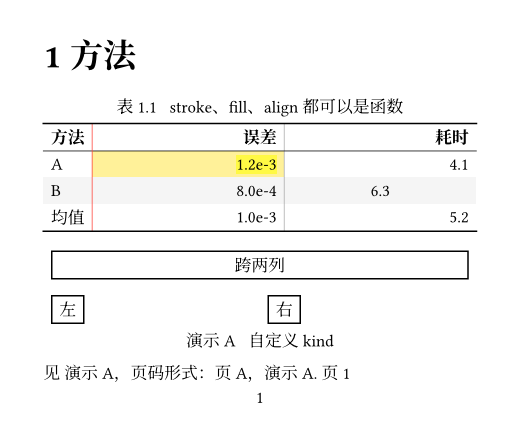
这里有几点是从渲染里观察到的:
- 用户自己传的
stroke函数替换了xuan的三线规则里的上沿线(上沿 1pt、表头下 0.5pt 是我在函数里重写的),下沿的 1pt 线还在,因为那是show table追加的。 table.cell(fill: ...)给单个单元格上色(图里黄色那格),table.cell(align: center)让“6.3”居中,其余同列单元格仍按表级的align函数右对齐。highlight放进单元格就是普通内容,不需要特殊处理。第 5 篇讲过highlight、underline、strike的参数,这里只是它们在表格里的用法。- 自定义
kind: "demo"、numbering: "A"的图不在figure-kinds里,所以xuan的show ref放过它,引用走 Typst 默认的逻辑:“演示 A”。@demo[页]把 supplement 换成了“页”,得到“页 A”。 #ref(<demo>, form: "page")是 0.15 里ref的form参数,"page"形式输出“页 1”,也就是被引用元素所在的页码。它要求页面有编号,我一开始没写numbering: "1",编译直接报cannot reference without page numbering,hint 说明了怎么办,所以上面这份实验文件里的#set page(... numbering: "1")是改过的。
子图:用 kind 自己搭
Typst 没有内置子图。lab/ch09/subfigures.typ(源文件)用一个新的 kind 搭出 (a)(b):
// Subfigures: a figure whose body is a grid of figures of another kind.#import "@local/xuan:0.1.0": *#set page(width: 12cm, height: auto, margin: 1cm)#show: xuan-base
#let sub(caption) = figure( kind: "subfigure", numbering: "(a)", supplement: [], image("assets/projection.svg"), caption: caption,)
= 比较
#figure( grid( columns: 2, column-gutter: 1em, [#sub[原始] <sub-a>], [#sub[重复] <sub-b>], ), caption: [两个子图,各自编号 (a)(b)。],) <fig-both>
@fig-both 中的 (@sub-a) 与 (@sub-b):引用只给出字母,括号写在正文里。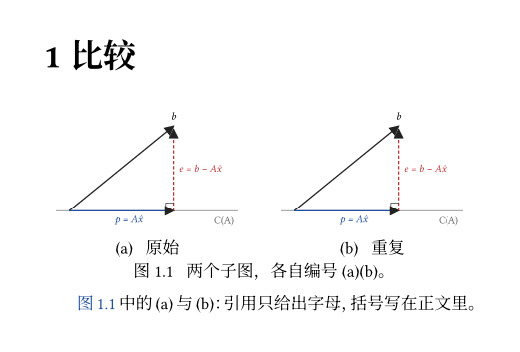
sub 是一个本地函数,造一个 kind: "subfigure"、numbering: "(a)" 的 figure,放进外层 figure 的 grid 里。"subfigure" 有自己的计数器,所以外层的图是“图 1.1”,里面的两张分别数 (a)、(b)。
有两处细节是我在 /tmp 里隔离出来的(最小实验,不在仓库里),原样记录下来:第一,supplement: none 时,标题里不显示编号,只剩“原始”,加上 supplement: [](空内容,不是 none)才会出现“(a) 原始”;第二,对 numbering: "(a)" 的元素做 @sub-a,引用文字里只有字母,括号被剥掉了,所以 lab 里写 (@sub-a) 自己补括号。我没有去查是 Typst 有意这样设计还是副作用;对我来说,知道它这么表现、写法上绕过去就够了。
ref:supplement、链接、脚注、引用块
lab/ch09/refs.typ(源文件)把几个互相不太相关的模型元素放在一起:
// ref, supplements, link, footnote, quote, divider, emph/strong rules.#import "@local/xuan:0.1.0": *#set page(width: 12cm, height: auto, margin: 1cm)#show: xuan-base
= 引用
== 小节 <sec-a>
@sec-a 引用标题,需要 `set heading(numbering: ...)`;`@sec-a[章节]` 可换补充词:@sec-a[章节]。#link("https://typst.app")[外部链接]、#link(<sec-a>)[内部链接]。脚注示例#footnote[脚注文字自动编号。]。
#quote(block: true, attribution: [Knuth])[ Premature optimization is the root of all evil.]
#divider()
// Restyle emphasis: no italics for CJK, a coloured underline for strong.#show emph: set text(style: "normal", fill: rgb("#8a3"))#show strong: it => underline(offset: 2pt, it)_强调_与*加粗*被重写了。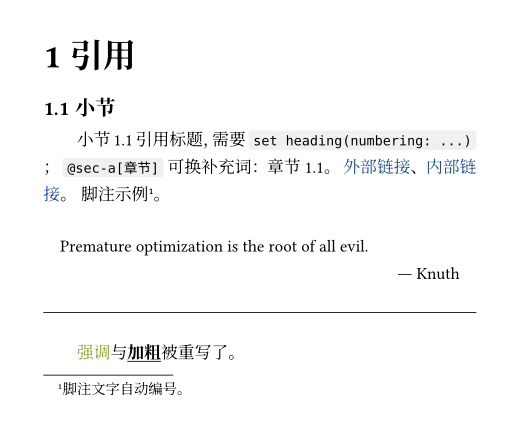
@label与 supplement。@sec-a引用一个标题,要求标题有编号(set heading(numbering: ...),xuan-base里已经设了"1.1"),显示成“小节 1.1”,“小节”是标题的默认 supplement。@sec-a[章节]用方括号替换 supplement,显示成“章节 1.1”。对图,上面讲过xuan的show ref把用户写的 supplement 放在最前面。link。#link("https://typst.app")[外部链接]是 URL,#link(<sec-a>)[内部链接]指向 label。链接的蓝色来自xuan-base里的show link: set text(fill: rgb("#1f4e9c"))。裸写的https://...也会自动变成链接,第 1 篇提过。footnote。#footnote[...]在正文处放一个上标编号,内容出现在页底并带一条分隔线。编号自动连续,跟图表编号互不相干。quote。 默认是行内,block: true变成缩进的块,attribution是出处,右下角的署名“Knuth”。行内的quote会自动给内容加上引号,我在/tmp里编译确认过,这里没有贴。divider。 0.15 新增的分隔线,一行#divider(),渲染成一条横线。- 改写
emph和strong。 文件末尾两条 show 规则是示范:show emph: set text(style: "normal", fill: ...)是 show-set,只改样式;show strong: it => underline(offset: 2pt, it)是 show 变换,把*加粗*换成带下划线的内容。渲染图里“加粗”两个字仍然是粗体,因为underline里放的it就是原来的strong元素,Typst 没有把这条规则对它的输出再应用一遍(我猜它跳过了规则自己输出里的同一元素,没有去读源码确认)。这两条只在这个 lab 文件里,xuan没有收录。至于中文里是不是该用斜体表示强调,我猜用加粗或着重号更常见,不过这是排版习惯问题,不是 Typst 的限制。
code.typ:块代码加行号
raw 是 Typst 的代码元素:反引号单行是行内,三个反引号多行是块,lang 指定高亮语言。lab/ch09/raw.typ(源文件):
// raw: inline, block, lang tag, line numbers (xuan), tab size, from a file.#import "@local/xuan:0.1.0": *#set page(width: 12cm, height: auto, margin: 1cm)#show: xuan-base
行内 `let x = 1` 与带语言的 #raw("fn main() {}", lang: "rust")。
// Block raw: xuan numbers every line through a `show raw.line` rule.```rustfn main() { println!("你好");}```
// `tab-size` sets the tab width, and only takes effect as a set rule.#[ #set raw(tab-size: 8) #raw("x\ty", block: true, lang: "text")]
// Pull code from a file, then show a few lines of it.#let src = read("assets/projection.svg")#raw(src.split("\n").slice(0, 3).join("\n"), block: true, lang: "xml")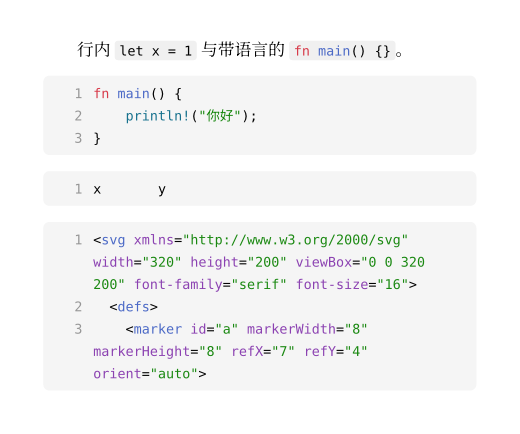
块和行内的区别是 raw.block。#raw("fn main() {}", lang: "rust") 是函数调用形式,和反引号等价;第二块用 read(...) 读一个文件的内容,切三行再交给 raw(block: true, lang: "xml"),所以文档里展示的代码可以不手抄。xuan 里这个模块只有 28 行(src/code.typ),全文如下:
// Code display: numbered block raw, subtle inline raw.
#let code-rules(body) = { show raw.where(block: false): it => box( fill: luma(240), inset: (x: 3pt), outset: (y: 3pt), radius: 2pt, it, ) show raw.where(block: true): it => { show raw.line: line => box(width: 100%, grid( columns: (2em, 1fr), column-gutter: 0.8em, align(right, text(fill: luma(150), str(line.number))), line.body, )) set par(first-line-indent: 0pt, justify: false) block( width: 100%, fill: luma(245), inset: 8pt, radius: 4pt, breakable: true, it, ) } body}行内部分很简单:raw.where(block: false) 包进一个浅灰底的 box,横向内边距 3pt,纵向用 outset 把底色向外多伸 3pt 而不推开行距,圆角 2pt。
块部分有三个要点。
行号来自 raw.line。 Typst 把 raw 的每一行包成一个 raw.line 元素,字段里有 number(行号)和 body(这一行高亮后的内容)。show 规则把每一行换成一个两列 grid:左边 2em 右对齐的灰色行号,右边是 line.body,列间距 0.8em。外面包一层 box(width: 100%) 让每一行成为行内元素并撑满宽度,这样一行太长折行时,续行只缩在代码列里,行号列不跟着折,正如渲染图里 SVG 的第一行折成三行却只有一个“1”。
show raw.line 写在 show raw.where(block: true) 里面。 这是源文件的写法,我没有试过把它挪到块规则外面,所以不能说外面行不行。
set par(first-line-indent: 0pt, justify: false)。 xuan-cjk 把 first-line-indent 设成 (amount: 2em, all: true),all: true 表示每一段包括标题后的第一段都缩进。我的本意是不让块代码继承这个缩进,也不让两端对齐拉开单词间距。我在 /tmp/p09/exp/nopar.typ 里删掉这一行,单行代码的渲染和有这一行的一模一样,没有复现出差别;这一行是预防性的,多行、含长行的代码块我没有逐个试。外框 block(width: 100%, fill: luma(245), inset: 8pt, radius: 4pt, breakable: true) 是浅灰圆角底,breakable: true 允许很长的代码跨页(这个我没有量页数)。
fig-code.typ 是为了看效果单独渲染的,注意它里面本身有反引号围栏,所以我用四个反引号包住:
#import "@local/xuan:0.1.0": *#set page(width: auto, height: auto, margin: 12pt)#show: xuan-base#set par(first-line-indent: 0pt)
#block(width: 9cm)[ ```typst #let f(x) = x * 2 #for i in range(3) [ 第 #i 项:#f(i) ] ```]行内代码 `f(3)` 有浅灰底。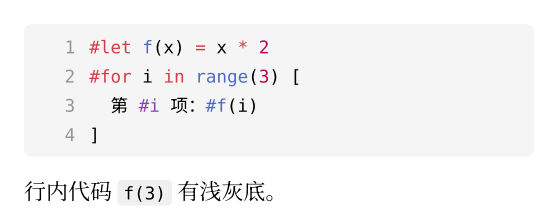
theme、syntaxes 与 tab-size
raw 还有三个我没放进 xuan 的参数。theme 换高亮配色(我传的是 .tmTheme 文件路径),syntaxes 登记额外的语法(我传的是 .sublime-syntax 文件路径),tab-size 设制表符宽度。我在 /tmp/p09/exp/ 里写了一个玩具语法和玩具主题(也不在仓库里):
%YAML 1.2---name: Toyfile_extensions: [toy]scope: source.toycontexts: main: - match: '\b(let|print)\b' scope: keyword.control.toy - match: '\b[0-9]+\b' scope: constant.numeric.toy - match: '#.*$' scope: comment.line.toy主题 toy.tmTheme 是一份 plist,只给了 keyword、constant.numeric、comment 三个 scope 上色:
<?xml version="1.0" encoding="UTF-8"?><plist version="1.0"><dict><key>name</key><string>Toy</string><key>settings</key><array><dict><key>settings</key><dict><key>foreground</key><string>#222222</string><key>background</key><string>#ffffff</string></dict></dict><dict><key>scope</key><string>keyword</string><key>settings</key><dict><key>foreground</key><string>#c0392b</string><key>fontStyle</key><string>bold</string></dict></dict><dict><key>scope</key><string>constant.numeric</string><key>settings</key><dict><key>foreground</key><string>#1f4e9c</string></dict></dict><dict><key>scope</key><string>comment</string><key>settings</key><dict><key>foreground</key><string>#888888</string><key>fontStyle</key><string>italic</string></dict></dict></array></dict></plist>然后是 /tmp/p09/exp/raw2.typ:
#import "@local/xuan:0.1.0": *#set page(width: 12cm, height: auto, margin: 1cm)#show: xuan-base#set par(first-line-indent: 0pt)
#let toy = "let x = 42\nprint x # 打印"
没有语法定义时无色:#raw(toy, block: true, lang: "toy")
#[ #set raw(syntaxes: "toy.sublime-syntax") 登记 syntaxes 之后有色:#raw(toy, block: true, lang: "toy")
#set raw(theme: "toy.tmTheme") 再换 theme:#raw(toy, block: true, lang: "toy")]
#show raw.where(block: true): set text(size: 8pt)缩小字号只影响块:`inline` 与块```typst= 标题```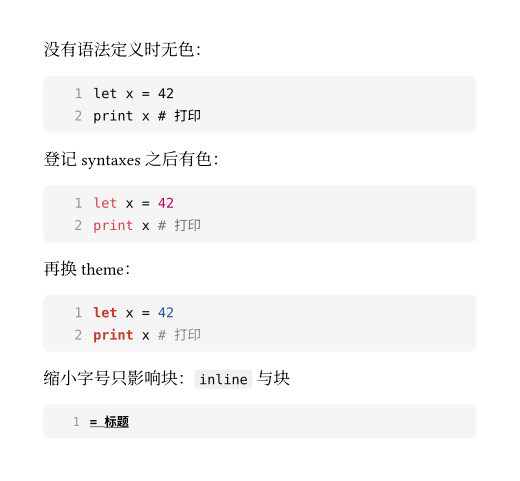
没有 syntaxes 时,lang: "toy" 找不到语法,代码不上色也不报错。登记之后按语法里的 scope 上色,配色来自默认主题。再设 theme,同一份语法换成了我在 tmTheme 里给的颜色。最后一块里,show raw.where(block: true): set text(size: 8pt) 只缩块不缩行内,这是 raw 选择器的常用写法。
tab-size 我专门量了。它是一个只对 set 规则可靠的参数,这是我在 /tmp/p09/exp/tab4.typ 里测出来的:
#set page(width: 12cm, height: auto, margin: 1cm)#context [ #let w(s) = measure(raw(s)).width #w("x\ty") #w("x y") #w("x y") #w("x y")]#set raw(tab-size: 8)#context [ #let w(s) = measure(raw(s)).width #w("x\ty") #w("x y") #w("x y") #w("x y")]#set raw(tab-size: 4)#context [ #let w(s) = measure(raw(s)).width #w("x\ty")]$ typst compile --root . --ignore-system-fonts tab4.typ tab4.pdf$ pdftotext -layout tab4.pdf -15.89pt 26.49pt 47.68pt 15.89pt 47.68pt 26.49pt 47.68pt15.89pt 26.49pt九个数字按顺序对应:默认 tab-size 下四个值(x⇥y、x 加三个空格再 y、x 加七个空格再 y、x y),set raw(tab-size: 8) 之后同样四个值,最后 tab-size: 4 一个值。等宽字体一个字符 5.3pt,所以 15.89pt 是 3 个字符宽、26.49pt 是 5 个、47.68pt 是 9 个。默认情况下 x⇥y 是 3 个字符宽:x,制表符补到第 2 列(默认 tab-size 为 2),y。set raw(tab-size: 8) 后变成 9 个字符,tab-size: 4 变成 5 个。即“制表符补空格到下一个 tab-size 的整数倍”。
lab 里的 raw.typ 也有一小段 tab-size:#set raw(tab-size: 8) 之后写 #raw("x\ty", block: true, lang: "text"),渲染图里 x 和 y 之间空了 7 格。lab 里最初的写法是把 tab-size: 8 直接传给 raw(...) 构造函数,那样制表符只有一个空格那么宽,我用 measure 一量也和默认值相同:构造函数里传的 tab-size 在 0.15.1 里没有效果(这一条只来自我在 /tmp 里的测量,现在的仓库里没有这种写法),只有 set 规则生效。至于这是 Typst 的 bug 还是我没读懂文档,我不确定。
units.typ:数字与单位
科学写作里数字和单位的排版有一套规矩:长数字按三位分组,数字和单位之间有细空格,单位是正体,负号是真正的减号而不是连字符。xuan 的 units.typ 把这些规矩收进三个函数。先看 lab/ch09/units.typ 的输入和输出(源文件):
// num, qty, qty-range from xuan.#import "@local/xuan:0.1.0": *#set page(width: 12cm, height: auto, margin: 1cm)#show: xuan-base#set par(first-line-indent: 0pt)
- `num("1234567.891")`:#num("1234567.891")- `num(-0.000012345)`:#num(-0.000012345)- `num(1234)`(四位不分组):#num(1234)- `qty(9.81, "m/s^2")`:#qty(9.81, "m/s^2")- `qty(1.2e5, "kg m^-1")`:#qty(120000, "kg m^-1")- `qty-range(20, 25, "°C")`:#qty-range(20, 25, "°C")- `qty-range(20, 25, "°C", lang: "en")`:#qty-range(20, 25, "°C", lang: "en")$ pdftotext -layout out/ch09/units.pdf -• num("1234567.891") :1 234 567.891• num(-0.000012345) :−0.000 012 345• num(1234) (四位不分组):1234• qty(9.81, "m/s^2") :9.81 m/s2• qty(1.2e5, "kg m^-1") :120 000 kg m−1• qty-range(20, 25, "°C") :20~25 °C• qty-range(20, 25, "°C", lang: "en") :20–25 °C(pdftotext 把上标抹平,所以是 m/s2,渲染图里是上标。)
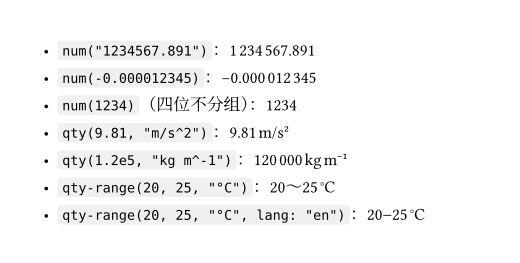
最终版 src/units.typ(66 行,源文件):
// Numbers and quantities: `num`, `qty`, `qty-range`.
#let thin = "\u{2009}"
/// Group a run of digits by thin spaces. From the right for integers,/// from the left for fractions; runs shorter than 5 digits stay intact.#let group(digits, from-right: true) = { let cs = digits.clusters() if cs.len() < 5 { return digits } let out = () let n = cs.len() for (i, c) in cs.enumerate() { let boundary = if from-right { calc.rem(n - i, 3) == 0 } else { calc.rem(i, 3) == 0 } if i > 0 and boundary { out.push(thin) } out.push(c) } out.join()}
/// Digits grouped by thin spaces, minus rendered as U+2212.#let num(value) = { let s = str(value).replace("-", "\u{2212}") let sign = "" if s.starts-with("\u{2212}") { sign = "\u{2212}" s = s.slice(3) } let parts = s.split(".") let whole = group(parts.at(0)) let frac = if parts.len() > 1 { "." + group(parts.at(1), from-right: false) } else { "" } sign + whole + frac}
/// Render a unit string such as "m/s^2" or "kg m^-1" upright.#let unit(spec) = { let pat = regex("(\s+|/)|([^\s/^]+)(?:\^([-+]?\d+))?") let parts = () for m in spec.matches(pat) { let sep = m.captures.at(0) if sep != none { parts.push(if sep == "/" { "/" } else { thin }) } else { parts.push(m.captures.at(1)) let p = m.captures.at(2) if p != none { parts.push(super(p.replace("-", "\u{2212}"))) } } } text(style: "normal", parts.join())}
/// Number plus unit, kept on one line.#let qty(value, spec) = box(num(value) + thin + unit(spec))
/// Range with unit: `lo~hi unit` (zh) or `lo–hi unit` (en)./// `lang: auto` follows `text.lang` at the call site.#let qty-range(lo, hi, spec, lang: auto) = { let build(l) = { let dash = if l == "zh" { "~" } else { "–" } box(num(lo) + dash + num(hi) + thin + unit(spec)) } if lang == auto { context build(text.lang) } else { build(lang) }}group:分组。 输入是一串数字字符。.clusters() 切成字素(这里就是单个数字,第 2 篇讲过字节、字素和码点的区别),少于 5 位直接返回,所以 1234 保持原样,测试里 num("1234") 断言的就是这一点。整数部分要从右往左每三位断开:第 i 个字符前面插入分隔,条件是它到末尾的距离 n - i 是 3 的倍数且不是第一个。小数部分反过来从左往右,条件是 i 是 3 的倍数。所以 1234567.891 得到 1 234 567.891,0.123456 得到 0.123 456。分隔符 thin 是 U+2009 细空格,是一个真正的字符,所以文本里能被复制出来。
num:加上符号与小数点。 str(value) 把数字或字符串统一成字符串(num(-0.000012345) 传的是浮点数,str 的结果是 -0.000012345)。先把 - 换成 U+2212,再用 starts-with 把它剥出来,用 s.slice(3) 去掉:U+2212 在 UTF-8 里是 3 个字节,而 slice 按字节算,这又是第 2 篇的主题。然后按 . 切整数与小数,各自 group,拼回去。num 返回 str,不是 content,所以后面能直接做字符串断言。它不做四舍五入,要显示几位就传几位,浮点数传进来之前自己想好。
unit:单位字符串解析。 "m/s^2" 和 "kg m^-1" 用一条正则拆开:(\s+|/)|([^\s/^]+)(?:\^([-+]?\d+))?。分支一匹配分隔符(空白或 /),分支二匹配一个单位记号,后面可以跟 ^ 与一个整数指数。spec.matches(pat) 返回所有匹配,每个匹配的 captures 按顺序给出三个括号里的内容;captures.at(0) 非 none 说明是分隔符,/ 原样输出,空白换成细空格;否则是记号,指数非空时放进 super(...),指数里的 - 同样换成真减号。最后 text(style: "normal", parts.join()) 保证单位是正体,即使周围在斜体里。
qty 与 qty-range。 qty(value, spec) 是 num 加细空格加 unit,用 box 包起来:box 是行内不可断行的容器,一个数量不会在数字和单位之间被折到两行。qty-range 的破折号随语言:中文 ~,英文 –。lang: auto 时用 context build(text.lang),在调用位置读当前语言;既然返回的是 context,在 plain-text 这类要把内容变成字符串的地方就读不到文字,所以测试里总是显式传 lang:。
测试:把 num 与 qty 的行为钉死
tests/units.typ(源文件):
#import "@local/xuan:0.1.0": *
#let thin = "\u{2009}"
// Groups of three from the decimal point outwards, from 5 digits up.#assert.eq(num("1234567.891"), "1" + thin + "234" + thin + "567.891")#assert.eq(num("1234"), "1234")#assert.eq(num("12345"), "12" + thin + "345")#assert.eq(num("0.123456"), "0." + "123" + thin + "456")#assert.eq(num(-1234567), "\u{2212}1" + thin + "234" + thin + "567")
// Quantities: upright unit, thin space after the number, `^n` superscripts.#assert.eq(plain-text(qty(9.81, "m/s^2")), "9.81" + thin + "m/s2")#assert.eq( plain-text(qty-range(0, 50, "mm", lang: "zh")), "0~50" + thin + "mm",)#assert.eq(plain-text(qty-range(0, 50, "mm", lang: "en")), "0–50" + thin + "mm")assert.eq 失败时整个编译失败,make test 逐个编译 tests/*.typ,编译通过就是测试通过:
$ nix develop --command make testtypst compile tests/glossary.typtypst compile tests/homework.typtypst compile tests/slides.typtypst compile tests/theorem.typtypst compile tests/units.typtypst compile tests/util.typqty 返回的是 box,不是字符串,所以测试里用第 3 篇写的 plain-text 把它展平,再和字符串比较。plain-text(qty(9.81, "m/s^2")) 得到 "9.81" + thin + "m/s2":指数 2 作为普通字符进了字符串,上标的“格式”在 plain-text 里是不见的,这点要记住,它测的是文字内容,不是排版。
要确认这些断言真的能失败,我在 /tmp/p09/exp/bad.typ 里写了一条故意错的:
#import "@local/xuan:0.1.0": *#assert.eq(num("12345"), "12345")$ typst compile --root . --ignore-system-fonts bad.typ bad.pdferror: equality assertion failed: value "12\u{2009}345" was not equal to "12345" ┌─ bad.typ:2:1 │2 │ #assert.eq(num("12345"), "12345") │ ^^^^^^^^^^^^^^^^^^^^^^^^^^^^^^^^失败信息里细空格以 \u{2009} 出现,正是第 1 篇讲过的转义写法,这样肉眼看不见的字符在报错里也能认出来。
三个文件怎么接进 xuan
figure.typ 和 code.typ 都不在 lib.typ 里导出:用户不需要直接调用它们,只需要 xuan-base 把它们的规则装上。lib.typ 这一篇新增的只有一行:
#import "src/units.typ": num, qty, qty-rangesrc/base.typ 的当前版本如下,这一篇新增的是 code-rules 与 figure-rules 的 import,和两行 show: figure-rules、show: code-rules:即上面 import 区里的 code.typ、figure.typ 两行,与末尾 show: figure-rules、show: code-rules 两行。
#import "cjk.typ": xuan-cjk#import "code.typ": code-rules#import "figure.typ": figure-rules#import "math.typ": math-rules#import "theorem.typ": theorem-rules
/// Document-wide defaults: CJK typography, heading numbering and spacing,/// link colour, theorem, equation, figure and code rules.#let xuan-base(body, lang: "zh", title: none) = { show: xuan-cjk.with(lang: lang) set heading(numbering: "1.1") show heading: set block(above: 1.4em, below: 0.9em) show heading.where(level: 1): set text(size: 1.4em) show heading.where(level: 1): set block(above: 1.8em, below: 1em) show link: set text(fill: rgb("#1f4e9c")) show: theorem-rules show: math-rules show: figure-rules show: code-rules body}figure-rules 里的 show ref、show table 与 code-rules 里的 show raw 作用在不同的元素上。theorem-rules 里的定理也是 figure(kind: "xuan-theorem"),它们和 figure-rules 共存靠的是 figure-kinds 这份白名单:xuan-theorem 不在里面,所以 figure-rules 的 show ref 放过定理的引用,由 theorem-rules 自己的 show ref 处理。
我没有做的事
figure 的 scope: "parent"(跨栏浮动)我没有编译,table 的 inset、gutter、stroke 参数的全部取值我也没有一一试,这些在官方文档里有。image 我只用了 SVG 的 image("assets/projection.svg", width: 60%),PNG、JPEG、PDF 页面的差别没有测。有兴趣的话可以拿 lab/ch09/ 的文件当起点,每次改一个参数,对照渲染图看。
下一篇是参考文献:BibTeX、Hayagriva、GB/T 7714 和 cite 的各种形式。图、表、代码和公式在这一篇之后都有了统一的编号,文献引用会是最后一类要接进 note 的东西。
支持与分享
如果这篇文章对你有帮助,欢迎分享给更多人或打赏支持!