
 Better Mistakes



音乐
暂未播放
context、计数器与状态:Typst 如何“多遍”编译
- 1第一份文档:标记语法、编译与 watch
- 2代码模式:值、类型与控制流
- 3函数与 content:一切都是函数调用
- 4set 与 show:样式是规则,不是命令
- 5字体与中文排版
- 6页面与布局:盒子、网格与浮动
- 7context、计数器与状态:Typst 如何“多遍”编译本文
- 8数学公式
- 9图、表、代码与交叉引用
- 10参考文献:BibTeX、Hayagriva 与 GB/T 7714
- 11数据驱动:用一份 YAML 生成中英文简历
- 12作业模板:模块、多文件与条件编译
- 13幻灯片与绘图
- 14生态:Typst Universe 与第三方包
- 15用 Rust 写一个 WebAssembly 插件:按拼音排序术语表
- 16导出、工具链与 CI
#let size = text.size 这一行会被 Typst 拒绝,报的是 error: can only be used when context is known,措辞很客气,还建议“把这个包在 context 表达式里”。这条报错背后是 Typst 最不像脚本语言的那部分设计:一份文档不是顺着源码从头执行到尾就完事的,页码、编号、目录、页眉都依赖“这个东西最后落在哪一页”,而这个答案只有排完版才知道。这一篇我把 context、counter、state、query 和 metadata 逐个跑一遍,数出编译器到底把文档编译了几遍,最后用它们写出 xuan 的页眉和定理环境。
这一篇结束时你会有两个新文件:src/header.typ 和 src/theorem.typ,都是最终版,文中完整展示。lib.typ、src/base.typ、src/note.typ 仍是第 4 篇的中间版本:它们当时已经 import 了这两个文件并调用了 xuan-header()、xuan-footer() 和 theorem-rules,这一篇没有再往里加行,只是把被调用的那一头讲清楚。lab/ch07/ 下的 9 个文件(含一个预期失败、一个预期警告的)全部通过 make ch07。
前置:第 6 篇(页面与布局,page 的 header/footer 参数)。fonts.typ、cjk.typ、page.typ 在第 5、6 篇已经写好。
为什么 text.size 要在 context 里
lab/ch07/no-context.fail.typ(源文件)只有两行:
// Style values are only known where the content ends up, hence `context`.#let size = text.sizemake ch07 把 stderr 存在 out/ch07/no-context.stderr:
error: can only be used when context is known ┌─ lab/ch07/no-context.fail.typ:2:17 │2 │ #let size = text.size │ ^^^^ │ = hint: try wrapping this in a `context` expression = hint: the `context` expression should wrap everything that depends on this function道理在第 4 篇已经埋下了:set text(size: ...) 往样式表里登记规则,规则的作用范围是源码里的一段区间,同一个函数写在别处,字号可以完全不同。let size = text.size 这一行在源码顶层求值,Typst 此刻不知道这个值将来会被放到哪里,所以“当前字号”这个问题没有答案。解法是把问题推迟:context 后面的表达式不立刻求值,整个包成一块不透明的 content,等它被放进文档、环境已知时再算。
我在 /tmp/p7/val.typ 里验证它到底有多“延迟”(这个目录下的实验都不在仓库里,代码全在文中,可以原样粘贴):
#set page(width: 12cm, height: auto, margin: 8pt)#let value = context text.size#value \#text(size: 20pt)[#value] \#[#set text(size: 7pt); #value]pdftotext -layout 的输出:
11pt20pt7ptvalue 只写了一次,却在三个地方算出三个值。它不是“字号”,而是“到时候去查字号的指令”。Typst 文档里的说法是 context 表达式的 body 会被求值零次、一次或多次,取决于它被放到几个地方。(这也是后面页眉的工作方式:同一个 context 块摆在每一页,每页各自算一遍。)
不透明带来三个后果,我各试了一次。
第一,不能对结果做运算。 /tmp/p7/add.typ:
#let f = context text.size#(f + 1pt)error: cannot add content and length ┌─ add.typ:2:2 │2 │ #(f + 1pt) │ ^^^^^^^f 的类型是 content,不是 length。想做运算,运算本身必须写进 context 里面:#context text.size + 1pt。
第二,比较不会报错,只会悄悄为假。 /tmp/p7/fn.typ:
#let f = context text.size#let g = if f == 11pt [是] else [否]#g输出是 否。字号明明是 11pt(默认值),但 f 是 content,content 与 length 比较得 false,没有任何警告。我觉得这是 context 最容易踩的坑:报错的错还好办,静默的错要靠记住“context 的结果只能被放置,不能被检查”来躲。
第三,measure、here、layout 这一类函数也需要 context。 here() 放在顶层会得到和上面一模一样的 can only be used when context is known,我另外试了 measure([abc]).width,同样的错误。
有一类地方不需要自己写 context:show 规则。第 4 篇说过 show heading: it => ... 里的函数在元素被实现化时调用,那一刻位置已知,所以 /tmp/p7/showctx.typ 可以直接读计数器:
#set page(width: 12cm, height: auto, margin: 8pt)#set heading(numbering: "1.")#show heading: it => [#it.body(#counter(heading).get())]= 甲= 乙甲((1,)) 乙((2,))根据文档,所有 show 规则都提供样式 context,但只有作用在可定位(locatable)元素上的 show 规则才提供位置 context,标题是可定位的。这一点在后面的 show ref 里会用到。
lab:context、here 与 measure
lab/ch07/context.typ(源文件)把上面几件事放在一起:
#set page(width: 14cm, height: auto, margin: 1cm)
// Style values like `text.size` exist only inside `context`.#set text(size: 14pt)#let size-now = context text.size
// The result is content that is resolved when it is placed.#assert.eq(type(size-now), content)#text(size: 20pt)[在 20pt 里:#size-now]
// `here()` is the current location; `locate`-style queries read its page.#context [第 #here().page() 页,位置 #here().position()。]
// `context` also gives access to `measure` and `layout`.#context { let w = measure([中文abc]).width [这行文字宽 #calc.round(w.pt(), digits: 1) pt。]}
#pagebreak()#context [这是第 #here().page() 页。]编译输出(pdftotext -layout out/ch07/context.pdf -):
在 20pt 里:20pt第 1 页,位置 (page: 1, x: 28.35pt, y: 77.27pt)。这行文字宽 50.9 pt。这是第 2 页。size-now 在 14pt 的环境里定义,被放进 text(size: 20pt) 之后读出 20pt:求值的环境是放置处,不是定义处。assert.eq(type(size-now), content) 把“它是 content”钉死了。measure 返回的是 length,.pt() 给出 float,不取整的话会打出一长串浮点尾巴,所以文件里用 calc.round(w.pt(), digits: 1) 取一位小数,得 50.9 pt。
位置:here、location 与 locate
here() 返回当前位置,类型是 location。location 本身没有多少内容,它是一个指向文档里某一点的句柄,拿着它可以去问“这一点在第几页、页面上什么坐标”,也可以交给 counter.at、state.at 去问“那一点的计数器是几”。/tmp/p7/loc.typ:
#set page(width: 14cm, height: 6cm)= 标题#context { let loc = query(heading).first().location() [类型 #type(loc),页 #loc.page(),位置 #loc.position() \ ] [here() 的 repr:#repr(here())]}标题类型 location,页 1,位置 (page: 1, x: 20.25pt, y: 20.25pt)here() 的 repr:location(..)repr(here()) 是 location(..),说明它的内部结构不对外暴露,能做的只有调方法。其中 .page() 是物理页序号,从 1 开始,与页码计数器无关;.position() 是带 page、x、y 的字典。
locate 的用法在不同版本里变过,所以我动手前先编译。在 0.15.1 里,locate 接受标签或选择器,要求它恰好匹配一个元素,返回那个元素的 location。/tmp/p7/posn.typ:
#set page(width: 8cm, height: 4cm)= 甲 <a>#pagebreak()= 乙 <b>#context [乙在 #locate(<b>).position() \ 页码 #locate(<b>).page()]乙在 (page: 2, x: 13.5pt, y: 13.5pt)页码 2它没有任何弃用警告。我同时试了两种老写法,都不能用:locate(loc => loc.page()) 这种回调形式会得到 error: only element functions can be used as selectors;标签出现不止一次则是 error: label occurs multiple times in the document。所以我现在的习惯是:想知道“我自己在哪”用 here(),想知道“那个有标签的东西在哪”用 locate(<label>),不再写回调。
嵌套的 context 看的是最内层
context 里面还可以再写 context,规则是读到的永远是最内层的环境。/tmp/p7/nest.typ:
#set page(width: 12cm, height: auto, margin: 8pt)#let c = counter("mycounter")#c.update(1)#context [ #c.update(2) 外层:#c.display() \ 内层:#context c.display()]外层:1内层:2外层的 c.display() 是在外层 context 的位置上求值的,而 c.update(2) 在这个 context 的内部,位于“求值点”之后,所以外层读到 1。内层 context 的求值被推迟到 c.update(2) 之后,读到 2。我第一次看到这个结果以为是 bug,后来想明白了:一块 context 在它开始的那一点读取世界,里面的 update 影响的是它之后的世界。
编译器怎么“多遍”工作
目录里要写页码,页码要排完版才知道,排版又要先有目录的长度。Typst 的做法是干脆多编译几遍:第一遍用占位值,排完版把所有内省的答案收集起来,第二遍用这些答案重排,直到答案不再变化。官方文档说上限是 5 遍,超过就停下并发出 document did not converge within five attempts 的警告。我想亲眼数一数,于是用 --timings(第 16 篇会专门讲)把每次编译的事件写成 JSON,再用 jq 数 iter (N) 事件的个数:
typst compile --timings t.json lab/ch07/counters.typ out.pdfjq '[.[]|select(.name|startswith("iter"))|select(.ph=="B")]|length' t.json在仓库的 nix develop 里跑了一遍我手头的所有文档,结果:
| 文档 | 编译遍数 |
|---|---|
/tmp/p7/plain.typ(一个标题加一句话,无内省) | 1 |
lab/ch07/context.typ、state.typ | 2 |
lab/ch07/counters.typ、query.typ、running-header.typ、theorems.typ | 3 |
examples/notes/main.typ(4 页笔记,含目录和术语表) | 4 |
lab/ch07/diverge.warn.typ | 5,并输出警告 |
一个没有内省的文档只编译 1 遍;#context 1 这样不读任何位置相关信息的 context 也是 1 遍(我另外试过)。一旦有东西去问“别处的值是多少”,至少要 2 遍:第一遍收集,第二遍确认答案没变。counters.typ 要 3 遍,我猜原因是它里面有一条在第二遍才稳定下来的依赖(final() 的值要等整份文档的更新跑完),不过这是推测,--timings 只告诉我遍数,没有告诉我是谁拖了第三遍。
收敛的判据,我能确认的只有这些:--timings 的事件里每一遍都有 introspect pages 和 check stabilized,只有发散的那份文档额外出现了 analyze introspections。我的读法是,每遍结束后编译器比较内省结果与上一遍是否一致,一致就停。
前向引用
多遍编译最直接的好处是能引用后面的东西。/tmp/p7/fwd.typ:
#set page(width: 10cm, height: auto, margin: 8pt)#set heading(numbering: "1.")本文共 #context counter(heading).final().first() 节,第 #context query(<last>).first().location().page() 页收尾。= 甲= 乙= 丙 <last>本文共 3 节, 第 1 页收尾。1. 甲2. 乙3. 丙开头那句话在三个标题之前,却知道总共有 3 节,最后一节在第 1 页。这个文档编译了 3 遍。
收敛的和不收敛的
再看一个会自己稳定下来的“自引用”。/tmp/p7/conv.typ:
#let s = state("s", 0)#context s.update(calc.min(s.final() + 1, 3))#context s.get()s 的更新依赖它自己的最终值,但 calc.min(..., 3) 给了它一个天花板。结果页面上是 3,stderr 为空,--timings 数出 4 遍:初值 0、1、2、3,然后确认 3 不再变化。
把天花板拿掉就是 lab/ch07/diverge.warn.typ(源文件):
// A state whose new value depends on its own final value never settles:// every layout pass changes the input of the next one.#let s = state("s", 0)#context s.update(s.final() + 1)#context s.get()每一遍里 s.final() 都比上一遍大 1,永远追不上自己。make ch07 的结果是 ok lab/ch07/diverge.warn.typ (warned as expected),stderr(out/ch07/diverge.stderr)一字不改:
warning: document did not converge within five attempts = hint: see 2 additional warnings for more details = hint: see https://typst.app/help/convergence for help
warning: value of `state("s")` did not converge ┌─ lab/ch07/diverge.warn.typ:4:18 │4 │ #context s.update(s.final() + 1) │ ^^^^^^^^^ │ = hint: the following values were observed: - run 1: `0` - run 2: `1` - run 3: `2` - run 4: `3` - run 5: `4` - final: `5` = hint: see https://typst.app/help/state-convergence for help
warning: value of `state("s")` did not converge ┌─ lab/ch07/diverge.warn.typ:5:9 │5 │ #context s.get() │ ^^^^^^^ │ = hint: the following values were observed: - run 1: `0` - run 2: `1` - run 3: `2` - run 4: `3` - run 5: `4` - final: `5` = hint: see https://typst.app/help/state-convergence for help这份诊断比“超过 5 遍了”有用得多:它指出是哪个 state、哪一行读到的值在变,并逐遍列出观察到的值,第 1 到第 5 遍是 0 到 4,最后一次排出来是 5。那两条 warning: value of state("s") did not converge 分别指向 s.final() 和 s.get(),也就是“读取了不稳定值”的两个位置。--timings 显示这个文档恰好跑了 5 遍,与警告里的 run 1 到 run 5 对得上。
警告只是警告,文档照样输出了 PDF,页面上 s.get() 印出的是 4(第 5 遍读到的值,而 final 已经是 5),哪一个都不是稳定的答案。写模板的时候我把它当成“自己设计错了”的信号:如果一个 state 的更新依赖自己的 final(),几乎一定应该换一种做法,比如先 query 出元素再统一算。
counter:带层级的整数数组
counter 是 Typst 里的命名整数序列,但它的值不是一个整数,而是一个数组:标题计数器 (2, 1) 表示“第 2 章第 1 节”。lab/ch07/counters.typ(源文件):
#set page(width: 14cm, height: auto, margin: 1cm)#set heading(numbering: "1.1")
// A counter is a named sequence of integer arrays.#let notes = counter("note")#let note(body) = { notes.step() block(stroke: (left: 2pt + blue), inset: (left: 6pt), [ *注 #context notes.display()*:#body ])}
= 第一节#note[第一条]#note[第二条]#metadata(none) <end-of-one>
= 第二节// `update` sets the value; functions can compute the next one.#notes.update(10)#note[从 10 重新开始,变成 11]#notes.update(n => n * 2)#note[22 之后加一得 23]
// Built-in counters: `page` and `heading`.#context [标题计数器现在是 #counter(heading).get(),页码 #counter(page).get()。]
// `at` reads a counter at a label; `final` reads it at the end of the document.#context [ 笔记总数 #notes.final().first()。 第一节结束时 heading 计数为 #counter(heading).at(<end-of-one>)。]
// 0.15: `display(at:)` formats the value at a given location.#context counter(heading).display("1.1", at: <end-of-one>)输出:
1 第一节 注 1:第一条 注 2:第二条
2 第二节 注 11:从 10 重新开始,变成 11 注 23:22 之后加一得 23标题计数器现在是 (2,),页码 (1,)。笔记总数 23。 第一节结束时 heading 计数为 (1,)。1逐条读:
step()加 1,update(n)直接设值,update(f)接一个函数,参数是旧值。notes.update(10)之后下一个step()得 11,update(n => n * 2)把 11 变成 22,再step()就是 23。这几个调用本身都是“往文档里放一条更新指令”,不是立刻改变量,它们和函数note里的notes.step()一样,只有被放进文档才生效。display()把当前值按计数器自己的编号格式显示,notes.display()缺省是"1"。必须在 context 里调用,因为它要问“此刻几号”。get()是数组,所以页码是(1,)而不是1。取第一个分量用.first(),这是后面页脚里counter(page).get().first()的由来。at(label)回到某个位置去读值,final()读文档末尾的值,二者都是“时间旅行”,都需要 context。- 这个文件最后一行是 0.15 新增的
display(at:):不用先at再格式化,一步到位。
注意同一块 context 里的两个读数:get() 读的是此刻,标题计数器是 (2,);at(<end-of-one>) 读的是标签所在的位置,标签贴在第一节的两条笔记之后,所以是 (1,),display(at:) 给出 1。at 只认标签落在文档的哪一点,不管你在哪里写这行读取代码。
层级、step(level:)、页码计数器
计数器的层级我另外做了一个实验,/tmp/p7/cx.typ:
#set page(width: 12cm, height: auto, margin: 8pt, numbering: "1")#set heading(numbering: "1.1")#let c = counter("c")= 甲== 子== 子二= 乙== 子三#context [ heading:#counter(heading).get() \ display():#counter(heading).display() \ display("1.1"):#counter(heading).display("1.1")]
#c.step() #c.step() #c.step()#context [get:#c.get() \ display("I"):#c.display("I")]
#c.update((2, 5))#context [update((2, 5)):#c.get() \ display("1.1"):#c.display("1.1")]
#c.step(level: 2)#context [step(level: 2):#c.get()]
#c.step(level: 1)#context [step(level: 1):#c.get()]
#counter(page).update(10)#pagebreak()#context [ 页码计数器:#counter(page).get() \ 物理页:#here().page() \ display("i"):#counter(page).display("i")]1甲1.1 子1.2 子二2乙2.1 子三heading:(2, 1)display():2.1display(“1.1”):2.1get:(3,)display(“I”):IIIupdate((2, 5)):(2, 5)display(“1.1”):2.5step(level: 2):(2, 6)step(level: 1):(3,)页码计数器:(11,)物理页:2display(“i”):xi(输出里的 “1.1”、“i” 是 PDF 里智能引号排出的弯引号,与计数器无关。)
- 内置的
counter(heading)在标题处自动step,一级标题step时把二级以下清零,所以第二章的第一节是(2, 1)。 step(level: 2)只增加第二个分量;step(level: 1)增加第一个并把后面的分量丢掉,(2, 6)变成(3,)。- 数组形式的
update((2, 5))一次设多层。display("1.1")在这个数组上输出2.5。 counter(page)是页码计数器:update(10)之后分页,下一页的计数器是 11,而here().page()仍是物理页 2。display("i")用小写罗马数字格式化出xi。页码计数器与物理页是两回事,所以页码可以从任意数字开始而不影响location.page()。
元素计数器:counter(figure.where(kind: ...))
编号不只来自标题和页码。每种 figure 有自己的计数器,可以用 where 选出来。/tmp/p7/cfig.typ:
#set page(width: 12cm, height: auto, margin: 8pt)#figure(rect(width: 1cm, height: 1cm), caption: [甲])#figure( table( columns: 1, [x], ), caption: [乙],)#figure(rect(width: 1cm, height: 1cm), caption: [丙])#context [ 图 #counter(figure.where(kind: image)).final().first(), 表 #counter(figure.where(kind: table)).final().first(), 全部 figure #counter(figure).final()] Figure 1: 甲 x Table 1: 乙 Figure 2: 丙图 2, 表 1, 全部 figure (3,)rect 放进 figure 被归到 image 这一类,table 另起一类,各自计数;不带 where 的 counter(figure) 数的是所有 figure,总共 3 个。这是第 9 篇里 xuan 把图和表按“章.序号”分别编号的基础,这篇的定理环境用同样的办法,下面会看到。
state:任意类型的“带历史的值”
counter 只能是整数数组。要记一个字符串、一个字典、一个不断增长的列表,用 state。我用一个类比讲它,只用这一次:state 是一本流水账。每次 update 是账本上新增的一行,get() 是“翻到我这一行,把到这里为止的所有记录累加起来的结果”,final() 是翻到最后一页。账不是在你写 update 的瞬间改的,而是在排版时按文档顺序一行一行算出来的。
lab/ch07/state.typ(源文件):
#set page(width: 14cm, height: auto, margin: 1cm)
// State is a value that changes through the document, like a counter that can// hold anything.#let mode = state("mode", "正常")当前模式:#context mode.get()
#mode.update("加粗")#let tagged(body) = context { if mode.get() == "加粗" { strong(body) } else { body }}#tagged[在“加粗”模式下]
#mode.update("正常")#tagged[回到正常模式]
// `at` and `final`.#context [ 最终模式:#mode.final()。 第 #here().page() 页开头的模式:#mode.at(<top>)。]#metadata(none) <top>
// A running maximum, updated with a function.#let best = state("best", 0)#for n in (3, 9, 4) { best.update(b => calc.max(b, n)) }最大值:#context best.get()输出:
当前模式:正常在“加粗”模式下回到正常模式最终模式:正常。 第 1 页开头的模式:正常。最大值:9pdftotext 看不出粗体,但第二行在 PDF 里是粗体:tagged 在 mode.get() 为“加粗”时用 strong,它放在 update("加粗") 之后、update("正常") 之前,所以只有它加粗。这个例子里 tagged 是在 update 之后才定义的函数,却能读到 update 的结果,这又是流水账:函数体在放置处求值,那时账已经记到了那一行。best.update(b => calc.max(b, n)) 是带函数的更新,循环三次后最大值 9。
update 什么时候生效
state 最容易让人困惑的是“我已经 update 了为什么读出来还是旧的”。我在 /tmp/p7/st.typ 里把几种情形放在一起:
#set page(width: 12cm, height: auto, margin: 8pt)#let s = state("s", 0)#let x = s.update(5)未放置:#context s.get() \#x放置之后:#context s.get() \#context { s.update(9) [同一个 context 里 update 之后立刻读:#s.get()]} \下一个 context:#context s.get()
#let log = state("log", ())#let note(t) = log.update(l => l + (t,))#note("甲") #note("乙")#context [此刻:#log.get().join("、")]#note("丙")#context [ 此刻:#log.get().join("、") \ 最终:#log.final().join("、")]未放置:0放置之后:5同一个 context 里 update 之后立刻读:5下一个 context:9此刻:甲、乙 此刻:甲、乙、丙最终:甲、乙、丙let x = s.update(5)只是创建了一条“更新指令”,值是 content。在#x把它放进文档之前,s.get()读到 0;放置之后读到 5。没被放进文档的 update 等于没写,这也是在函数里调用s.update(...)却忘了返回它的典型症状。context { s.update(9); [...#s.get()] }在update(9)之后立刻读,读到的是 5 而不是 9,和上面嵌套 context 的结论一致:这块 context 在开始处读世界,里面的update影响的是它之后的内容。下一个 context 就读到 9。- 最后一组是账本的样子:同样的
log.get().join("、"),第一次放在两条记录之后,读到“甲、乙”;放在第三条之后,读到“甲、乙、丙”。final()不管放在哪里都是整本账。
counter 还是 state
我现在的选择标准很粗:值是递增的整数,而且想用 numbering 格式化,就用 counter(定理编号、脚注编号都是);值是别的类型,或者更新规则是“取最大”“追加一项”这种,用 state。官方文档对 state 有一段警告,说它容易被滥用,因为 update 的结果依赖文档顺序,必须反复排版才能稳定,我的理解是能用 query 一次算出来的就不要用 state 去累加,上面的发散例子就是这类滥用的极端形式。
query 与 metadata:问文档“里面有什么”
counter 和 state 问的是“某处的值”,query 问的是“文档里有哪些元素”。lab/ch07/query.typ(源文件):
#set page(width: 14cm, height: auto, margin: 1cm)#set heading(numbering: "1.1")
// `query` returns every element that matches a selector, document-wide.#outline(title: [自制目录], target: heading.where(level: 1))
= 简介= 方法 <methods>== 细节= 结果
#context { let all = query(heading) [文档里有 #all.len() 个标题:#all.map(h => h.body).join("、")。] linebreak() let after = query(heading.where(level: 1).after(<methods>)) [`<methods>` 之后有 #after.len() 个一级标题,最后一个在第 #after.last().location().page() 页。]}
// `metadata` carries arbitrary data to a query without printing anything.#metadata((author: "bfmhno3")) <meta>#context query(<meta>).first().value.author输出:
自制目录1 简介 . . . . . . . . . . . . . . . . . . . . . . . . . . . . . . . . . . . . . 12 方法 . . . . . . . . . . . . . . . . . . . . . . . . . . . . . . . . . . . . . 13 结果 . . . . . . . . . . . . . . . . . . . . . . . . . . . . . . . . . . . . . 1
1 简介
2 方法2.1 细节
3 结果文档里有 5 个标题:自制目录、简介、方法、细节、结果。<methods> 之后有 2 个一级标题,最后一个在第 1 页。
bfmhno3(目录里的点线我缩短了,其余原样。)有几个细节:
outline本身就是一次query:target: heading.where(level: 1)只收一级标题,所以目录里没有“细节”。- 文档里“有 5 个标题”,比肉眼看到的多一个:
outline(title: [自制目录])的标题也是heading(只是outlined: false),query(heading)把它一起算进来了。我第一次数出 5 而不是 4 愣了一下。 after(<methods>)默认包含锚点本身,所以“方法”“结果”两个一级标题都在里面。我另外试了/tmp/p7/incl.typ:
= 甲= 乙 <m>= 丙#context [ 含锚点:#query(selector(heading).after(<m>)).len() \ 不含:#query(selector(heading).after(<m>, inclusive: false)).len()]含锚点:2不含:1注意要写 selector(heading).after(...):heading.after 不存在,报错是 function `heading` does not contain field `after` 。第 4 篇讲的 before/after/within 选择器不能驱动 show,现在你知道它们该在哪用了:query 里。
metadata是一个不输出任何内容的元素,唯一的用途是把一份数据挂在一个位置上,让别处的query取走。query(<meta>).first().value.author取回bfmhno3。第 12 篇的作业模板就是这样把每道题的分值藏在metadata里,再在页眉块里query出来求和。
运行页眉:lab/ch07/running-header.typ
把 here() 和 query 合起来,就能做“页眉跟随章节”。lab/ch07/running-header.typ(源文件):
#set page( width: 12cm, height: 7cm, margin: (top: 2cm, rest: 1cm), header: context { // The header sees the document as of its own page. let here-page = here().page() let starts = query(heading.where(level: 1)).any(h => ( h.location().page() == here-page )) if not starts { let before = query(heading.where(level: 1).before(here())) if before.len() > 0 { emph(before.last().body) } } },)#set heading(numbering: "1.")#show heading.where(level: 1): it => pagebreak(weak: true) + it
= 第一章#lorem(80)
= 第二章#lorem(120)header: 接受一个 content,我给的是一个 context 块,所以它在每一页各被求值一次,每次 here() 是那一页页眉的位置。逻辑分两步:先 query 出所有一级标题,看有没有哪个落在当前页(h.location().page() == here-page),有就不显示页眉,章首页不需要;没有则取“当前位置之前最近的一个一级标题”,用 before(here()) 选出来,.last() 就是它。
渲染(4 页,我把 4 页并排放进一张图里):

第 1、3 页是章首页,没有页眉;第 2、4 页的页眉分别是“第一章”“第二章”。这个文档编译了 3 遍。
xuan-header 与 xuan-footer
xuan 的页眉在这个思路上多了两样东西:右边放文档标题,下面加一条细线。src/header.typ 整个文件如下(27 行,源文件),这是最终版:
/// Running header: current chapter on the left, document title on the right./// Suppressed on pages that start a level-1 heading.#let xuan-header() = context { let starts = query(heading.where(level: 1)).any(h => ( h.location().page() == here().page() )) if not starts { let before = query(heading.where(level: 1).before(here())) let chapter = if before.len() > 0 { before.last().body } else { none } let title = document.title set text(size: 0.85em) grid( columns: (1fr, 1fr), align(left, chapter), align(right, title), ) v(-0.5em) line(length: 100%, stroke: 0.4pt) }}
/// Footer: `第 x 页 / 共 y 页` (zh) or `x / y` (en).#let xuan-footer(lang: "zh") = context { let x = counter(page).get().first() let y = counter(page).final().first() set text(size: 0.85em) align(center, if lang == "zh" [第 #x 页 / 共 #y 页] else [#x / #y])}和 lab 里的版本相比:
xuan-header()是一个返回 content 的函数,不是 content 本身。note里写set page(header: xuan-header()),调用发生在set的时候,得到的是一块context,之后每一页再各自求值一次,和上面讲的“一块 context 被放在多处”完全一致。- 右边是
document.title。document的字段也是 context 才能读的样式值,note里的set document(title: title, ...)在页眉求值之前就登记好了。左边的章名来自query;文档第一个一级标题之前,chapter是none,align(left, none)什么也不画,页眉只剩标题。我用/tmp/p7/pre.typ(note加 1500 词的lorem,再跟一个一级标题)排了一遍,第 1 页页眉右上角确实只有标题。 grid(columns: (1fr, 1fr), ...)让左右各占一半,v(-0.5em)把细线往上收一点,line(length: 100%, stroke: 0.4pt)画 0.4pt 的横线。xuan-footer用counter(page).get().first()和counter(page).final().first()拿到“当前页”和“总页数”,这就是上面final()的用途。总页数在第一遍是占位,之后收敛。中文版是第 x 页 / 共 y 页,英文版是x / y。
在 examples/notes/main.typ 的 4 页输出里,第 2 页的页眉是 最小二乘 在左、线性代数笔记:最小二乘与 SVD 在右(pdftotext -layout 的一行,我用 grep 看过)。整个笔记编译 4 遍。
定理环境:为什么 show ref 要读 el.location()
页眉只读不写,定理环境要写:它要自己维护一个计数器,每章清零,并且让 @label 引用能打出“定理 1.2”。先看 lab/ch07/theorems.typ(源文件)怎么用:
#import "@local/xuan:0.1.0": *
#show: note.with(title: "定理环境", author: "bfmhno3", date: datetime( year: 2026, month: 1, day: 1,))
= 向量空间
#definition( title: "线性无关",)[若 $sum c_i v_i = 0$ 蕴含所有 $c_i = 0$,则称 $v_i$ 线性无关。] <def-li>
#theorem(title: "秩–零化度")[$"rank"(A) + dim ker(A) = n$。] <thm-rn>
#proof[略。]
= 正交性
#lemma[正交向量线性无关。] <lem-orth>
见 @def-li、@thm-rn 与 @lem-orth。输出(pdftotext -layout 的正文部分):
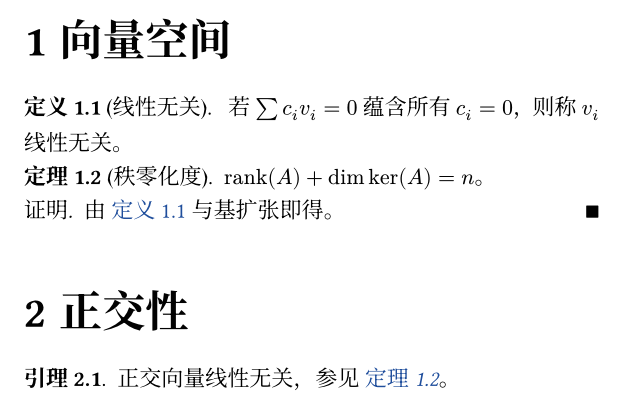
1 向量空间定义 1.1 (线性无关). 若 ∑ 𝑐𝑖 𝑣𝑖 = 0 蕴含所有 𝑐𝑖 = 0,则称 𝑣𝑖 线性无关。定理 1.2 (秩–零化度). rank(𝐴) + dim ker(𝐴) = 𝑛。证明. 略。 ∎
2 正交性引理 2.1. 正交向量线性无关。 见 定义 1.1、定理 1.2 与 引理 2.1。注意三点:定义和定理共用一个计数器(定义 1.1 之后是定理 1.2,不是“定理 1.1”);证明不编号;第二章的第一个引理从 2.1 重新开始,不是 1.3。
fig-theorem.typ 渲染出来是这样:
src/theorem.typ
这个文件有 78 行,下面是完整的最终版(源文件):
// Numbered environments (theorem, lemma, ...) that share one counter,// restart at every level-1 heading and can be referenced with `@label`.
#let theorem-kind = "xuan-theorem"
/// "<chapter>.<n>" for the environment figure `el`.#let env-number(el) = { let loc = el.location() numbering( "1.1", counter(heading).at(loc).first(), el.counter.at(loc).first(), )}
/// Build an environment function `(title: none, body)`.#let make-env(supplement-zh, supplement-en) = { (title: none, body) => figure( kind: theorem-kind, supplement: context { if text.lang == "zh" { supplement-zh } else { supplement-en } }, caption: title, outlined: false, gap: 0pt, body, )}
#let theorem = make-env("定理", "Theorem")#let lemma = make-env("引理", "Lemma")#let corollary = make-env("推论", "Corollary")#let definition = make-env("定义", "Definition")#let example = make-env("例", "Example")
/// Unnumbered proof ending with a right-aligned ∎.#let proof(body) = { block(width: 100%, above: 0.8em, below: 0.8em, { set par(first-line-indent: 0pt) emph(context if text.lang == "zh" [证明.] else [Proof.]) h(0.5em) body h(1fr) sym.qed })}
/// Show rules for the environments; applied by `xuan-base`.#let theorem-rules(body) = { show heading.where(level: 1): it => { counter(figure.where(kind: theorem-kind)).update(0) it } show figure.where(kind: theorem-kind): it => block( width: 100%, above: 0.8em, below: 0.8em, { set align(left) set par(first-line-indent: 0pt) strong[#it.supplement #env-number(it)] if it.caption != none [ (#it.caption.body)] [.] h(0.5em) emph(it.body) }, ) show ref: it => { let el = it.element if el != none and el.func() == figure and el.kind == theorem-kind { let supp = if it.supplement == auto { el.supplement } else { it.supplement } link(el.location(), [#supp~#env-number(el)]) } else { it } } body}我把设计拆成五个决定。
1. 环境就是 figure。 所有环境函数都返回 figure(kind: "xuan-theorem", ...)。Typst 的 figure 自带“同 kind 的 figure 共用一个计数器”、“可以被 @label 引用”、“有 supplement(引用时的前缀词)”这三样东西,定理环境需要的全有,所以不用自己造轮子。caption: title 把定理的标题塞进 caption 槽,outlined: false 不让它们出现在 outline(target: figure) 里,gap: 0pt 去掉 body 与 caption 之间的间距。五种环境共用同一个 kind,所以共用一个计数器:定义 1.1 之后是定理 1.2。
2. supplement 是 context。 supplement: context { if text.lang == "zh" ... } 根据语言选“定理”或 “Theorem”。xuan-base 通过 xuan-cjk 把 lang 设进 text,这里读 text.lang 才能跟着走,所以必须推迟到 context 里。
3. 每章清零。 show heading.where(level: 1): it => { counter(...).update(0); it } 在每个一级标题前面放一条“把定理计数器清零”的指令,再输出标题本身。counter(figure.where(kind: theorem-kind)) 选中的就是这些环境的计数器。这里的 update(0) 和上面 step/update 的行为完全一样:是放进文档的一条指令,在排版时按文档顺序执行。
4. 编号由 env-number 算:counter(heading).at(loc) 加 el.counter.at(loc)。 章号取标题计数器在这个环境所在位置的值,序号取环境自己的计数器在同一位置的值,用 numbering("1.1", 章, 序) 拼成 1.2。这里的关键是 loc = el.location():不管谁来调用 env-number,答案都由环境元素自己的位置决定。
5. show ref 同样读 el.location()。 重点来了。@thm-rn 本来就能引用 figure,为什么还要重写 show ref?我实验了三版。
实验一:去掉 show ref
我把 theorem.typ 拷成 /tmp/p7/noref.typ,删掉 show ref 那一段,其余不动,再写一份 /tmp/p7/noref-test.typ:
#import "noref.typ": *#set page(width: 12cm, height: auto, margin: 8pt)#set heading(numbering: "1.1")#show: theorem-rules= 甲#theorem[一] <a>#lemma[二] <b>= 乙#theorem[三] <c>见 @a、@b、@c。1甲Theorem 1.1. 一Lemma 1.2. 二
2乙Theorem 2.1. 三见 Theorem 1、Lemma 2、Theorem 1。(这里没有设语言,所以 supplement 是英文。)定理本身的编号是对的(env-number 在起作用),可引用成了 Theorem 1、Lemma 2、Theorem 1:默认的 ref 只用 figure 自己的编号,没有章号,而且 @a 和 @c 变成了同一个“Theorem 1”。在这种情况下,写 @c 的读者去找“Theorem 1”会找到两处。
实验二:最直觉的修法,让 numbering 去读标题计数器
既然 figure 的 numbering 可以是函数,能不能在函数里直接读 counter(heading).get() 拼出章号?/tmp/p7/hack.typ:
#set page(width: 12cm, height: auto, margin: 8pt)#set heading(numbering: "1.1")#show heading.where(level: 1): it => { counter(figure.where(kind: "thm")).update(0) it}#let thm(body) = figure( kind: "thm", supplement: [定理], numbering: n => context numbering("1.1", counter(heading).get().first(), n), body,)= 甲#thm[一] <a>= 乙#thm[二] <b>见 @a 与 @b。1甲 一
2乙 二见 定理 2.1 与 定理 2.1。@a 指的明明是第一章的定理,却显示成了 2.1:ref 在引用所在的位置调用 numbering,那时标题计数器是 2,所以第一章的定理被印上了第二章的章号。(我猜 ref 的实现就是这样,因为输出与这种读法完全吻合,不过我没有读编译器的源码去证实。)get() 取的是“此刻”,而此刻是引用处,不是定理处。
实验三:读 el.location()
办法是不要在引用处去问“此刻几号”,而是拿到被引用元素的位置,去问那个位置的计数器。/tmp/p7/fixed.typ 是 theorem.typ 的缩小版:
#set page(width: 12cm, height: auto, margin: 8pt)#set heading(numbering: "1.1")#show heading.where(level: 1): it => { counter(figure.where(kind: "thm")).update(0) it}#let number-of(el) = { let loc = el.location() numbering("1.1", counter(heading).at(loc).first(), el.counter.at(loc).first())}#let thm(body) = figure(kind: "thm", supplement: [定理], body)#show figure.where( kind: "thm",): it => block[*#it.supplement #number-of(it)* #it.body]#show ref: it => { let el = it.element if el != none and el.func() == figure and el.kind == "thm" { link(el.location(), [#el.supplement~#number-of(el)]) } else { it }}= 甲#thm[一] <a>= 乙#thm[二] <b>见 @a 与 @b。1甲 定理 1.1 一
2乙 定理 2.1 二见 定理 1.1 与 定理 2.1。对了。it.element 是 ref 指向的元素,el.location() 是它的位置句柄,counter.at(loc) 是“时间旅行”,无论这条 @label 写在哪一章,答案都一样。xuan 的 theorem.typ 就是这个版本,只是多做了三件事:it.supplement == auto 时用元素自己的 supplement,否则尊重用户写的 @thm-rn[式] 之类的自定义;link(el.location(), ...) 让引用可点击,跳到定理处(所以渲染图里“定义 1.1”是蓝色的);~ 是不换行空格,不让“定理”和“1.2”被拆在两行。
还有一个条件判断:it.element 在引用文献时是 none,在引用别的元素(标题、公式)时不是 figure,这两类要原样放过去(else { it }),否则整份文档的引用都被这条规则吞掉。我把 el != none and 删掉,拷成 /tmp/p7/nog.typ,再排一份带 @smith 和 #bibliography("refs.bib") 的文档,得到:
error: type none has no method `func` ┌─ nog.typ:70:7 │70 │ if el.func() == figure and el.kind == theorem-kind { │ ^^^^^^^
while showing ref element at nog-test.typ:4:2 @smith保留判断的版本里 @smith 照常显示为 [1]。第 8、9 篇的 math.typ、figure.typ 里的 show ref 用的是同一个模式。
两处调用 env-number(el):定理自己的 show 规则(画“定理 1.2.”那个标题)和 show ref(画引用文字)。它们用同一个函数、同一个 el.location(),所以定理处和引用处的编号永远一致,不可能出现“正文是 1.2,引用成了 1.3”。
这个模块怎么测
tests/theorem.typ 的 19 行是我对这个模块的回归断言(源文件):
#import "@local/xuan:0.1.0": *#show: xuan-base
= 第一章#theorem[甲] <t1>#lemma[乙] <t2>#proof[略。]#example[丙] <t3>
= 第二章#theorem[丁] <t4>
#context { // One counter is shared by all environments and restarts at each chapter. let n(l) = counter(figure.where(kind: "xuan-theorem")).at(l).first() assert.eq((n(<t1>), n(<t2>), n(<t3>), n(<t4>)), (1, 2, 3, 1)) // `proof` is unnumbered. assert.eq(query(figure.where(kind: "xuan-theorem")).len(), 4)}它用的全是这一篇的东西:counter.at(label)、query、context 里的 assert.eq。四个环境的序号是 1, 2, 3, 1,说明三种环境共用一个计数器、第二章重新开始;query 数出 4 个 figure,说明 proof 没有被算进去。make test 到第 16 篇再讲。
跑一遍
这一篇的 9 个 lab 文件一起编译:
$ nix develop --command make ch07./scripts/chapter.sh ch07ok lab/ch07/context.typok lab/ch07/counters.typok lab/ch07/diverge.warn.typ (warned as expected)ok lab/ch07/fig-theorem.typok lab/ch07/no-context.fail.typ (failed as expected)ok lab/ch07/query.typok lab/ch07/running-header.typok lab/ch07/state.typok lab/ch07/theorems.typ接下来
到这里 xuan 的 src/ 已经有 util、fonts、cjk、page、header、theorem、base、note 八个文件,一份带章节页眉、总页数页脚、定理环境的 A4 笔记已经可以排了。缺的是数学:theorem.typ 的例子里那些 $sum c_i v_i = 0$ 现在只是借用,下一篇专门讲 Typst 的数学模式,同时补上 src/math.typ,把公式编号也改成“章.序号”,用的正是今天这一套 counter 加 show ref。
如果想自己多玩一会儿:把 diverge.warn.typ 里的 s.final() 换成 s.at(<end>),在末尾放 #metadata(none) <end>,再用 --timings 数遍数,看它是不是比 5 遍少。我没有试,不知道编译器会不会把这种写法也判成发散。
支持与分享
如果这篇文章对你有帮助,欢迎分享给更多人或打赏支持!